


Google Gemini Enterprise
4.164.00 Reviews
App Specs
- Version
- 26.08.2408.969650285
- Updated On
- License
- Free
- Downloads
- 1,000,000+
- Developer
- Google LLC
- Categories
- Productivity
- Platform
- Android
Screenshots
 Analysis by AppCompare
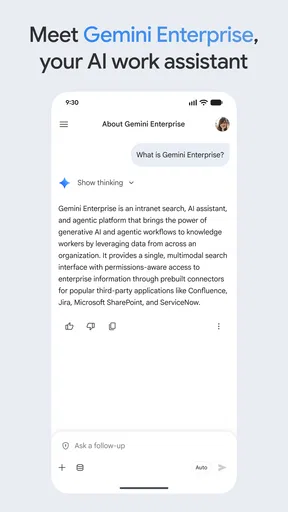
I approached Google Gemini Enterprise as a practical productivity tool rather than another general chatbot. Its purpose is to let people work with their company’s AI agents and receive answers from business data while away from a desk. That focus makes it more interesting for teams than a basic question-and-answer assistant, but it also means the value depends heavily on how useful and well-organized the connected company information is.
After spending time with it, my first impression is that this is an app for continuing work, not replacing every work system on a phone. I can imagine opening it between meetings, checking a business detail, asking for a quick explanation, or using an existing agent to move a task forward. I would not treat every answer as final without checking the underlying source, especially when the question affects customers, money, compliance, or an important decision.
Google LLC presents it as a free productivity app with an Everyone content rating. The current version is 26.08.1708.965874898, and it requires Android eleven or later. That combination makes it accessible to many recent Android devices, although the minimum operating-system requirement is worth checking before planning a rollout across a mixed fleet.
How Google Gemini Enterprise fits into everyday work
I find this app most useful when a work question comes up at exactly the wrong moment: I’m between meetings, away from my desk, and know the answer is somewhere in company information but not where to look. In this section, I’ll focus on how that mobile access can fit around real work rather than replace the tools a team already relies on. The next section looks at the small habits that make those quick questions more useful and easier to check.
A mobile doorway into company knowledge
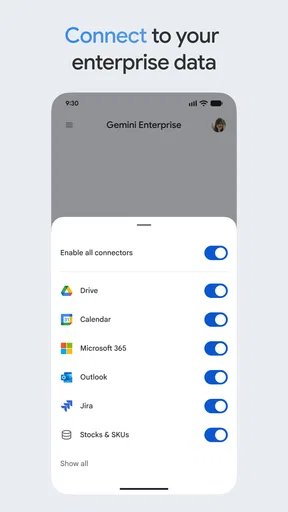
The most useful way to think about this app is as a mobile doorway into business intelligence. Instead of searching through several folders, messages, documents, or internal tools, I can ask a question in ordinary language and let an AI agent help locate or interpret the relevant information. The benefit is not simply that the app can write a sentence quickly. The benefit is that it can make company information easier to approach when I already know what I need but do not remember where it lives.
That distinction matters. A conventional search box usually rewards precise keywords. A conversational assistant is more forgiving when I ask something like, “What should I know before replying to this client?” or “Which internal guidance applies to this situation?” The answer still needs judgment, but the interaction feels closer to asking a knowledgeable colleague than navigating a rigid filing system.
For a salesperson traveling between appointments, the app could be useful for reviewing product information before a call. For a support worker, it may help turn a broad question into a more focused request for internal guidance. For a manager, it can provide a quick starting point when preparing a discussion. In each case, I see the strongest role as reducing the time spent finding and organizing information, not removing the need to understand it.
Worth Reading Before You Choose

EA SPORTS FC Mobile 26 Is a Bigger Football Game, but It Takes Time

Flipboard Shows What News Apps Must Do Beyond the Feed

Switching to Android Auto Means Rethinking Your Driving Routine

Google Calendar Makes a Crowded Week Easier to Manage

Ludo King Makes the Most of the Minutes Between Plans

Baby Panda World Brings Quick Play to Modern Phones, but Its Game Library Feels Busy
A realistic day-to-day scenario
Imagine I am leaving one meeting and have ten minutes before the next. A customer has asked about a service detail, but I remember that the answer is buried somewhere in company material. I could use the app to ask for the relevant explanation, then request a shorter version suitable for a reply. Before sending anything, I would compare the result with the source or ask a colleague to confirm the important part. That workflow is faster than starting from a blank search, while still keeping a human check in the loop.
The same pattern works for internal preparation. I might ask an agent to summarize the key points from a business topic, identify what needs clarification, and suggest questions for a meeting. The practical advantage is the sequence: retrieve, organize, and refine. A generic chatbot can help with the last step, but it may not know the company context that makes the first two steps useful.
There is also a trade-off in this convenience. A polished answer can feel more authoritative than it deserves. I would avoid copying an answer directly into an external message when the subject involves contractual commitments, confidential details, or changing procedures. The app can shorten the path to an answer, but it does not turn an uncertain source into a certain one.
Where it differs from ordinary productivity apps
Compared with a notes app, Gemini Enterprise is less about manually collecting information and more about asking for an interpretation of information already available to the organization. Compared with a traditional search tool, it is more natural when the request is complicated or poorly phrased. Compared with a general AI assistant, its business orientation should make it more relevant for workplace questions, provided the appropriate company data and agents are available.
That last condition is important. If I only need personal reminders, a shopping list, or a simple calendar note, this is probably more than I need. A standard notes or task app may be quicker and easier. Likewise, if my team does not have useful internal material organized for the experience, the app may feel like a conversational shell without enough substance behind it.
Small habits that improve the results
I found that the quality of a request matters more than its length. Instead of asking for “information about the customer,” I would identify the purpose, audience, and time frame: summarize the relevant guidance for a customer-facing reply, or compare the current internal instructions with the question I received. This gives the agent a clearer job and makes the response easier to evaluate.
A second useful habit is to ask for structure rather than merely asking for a summary. A response divided into “known,” “unclear,” and “next action” is more useful during a busy workday than a smooth paragraph that hides uncertainty. I would also ask the app to preserve important terminology when the answer relates to a process or policy, because excessive simplification can remove the detail that makes the information safe to use.
My third tip is to treat a conversation as a draft workspace, not a permanent record of truth. I would keep the final decision or approved wording in the team’s normal system rather than relying on an old chat response later. This is especially helpful when information changes, because a previously helpful answer can become misleading even if the question looks similar.
What the current release tells me
The current release, 26.08.1708.965874898, gives users a concrete version to identify when checking compatibility or discussing an update with colleagues. The app was released on February 25, 2026, so I see it as a relatively recent mobile product rather than a mature utility with years of established habits behind it. That makes the experience promising for teams willing to adapt, but I would introduce it gradually instead of making it the sole route to essential information immediately.
For existing users, a version update is most meaningful when it improves reliability, agent handling, or the way answers connect to company information. I would pay attention to whether everyday tasks feel more consistent after updating, not just whether the version number changes. If the app is already part of a team workflow, a sensible approach is to test a few repeatable questions before and after an update and compare the usefulness of the responses manually.
I would also separate what is available today from what I hope the product becomes. The current appeal is the mobile access to company AI agents and business answers. It would be easy to imagine deeper automation, broader integrations, or more detailed controls, but I would not make a purchasing or rollout decision based on imagined additions. The app should earn its place through the work it handles now.
What existing users should expect
Someone already using Google’s broader AI tools may find the enterprise focus helpful because the questions can be framed around workplace information rather than general knowledge. However, familiarity with a consumer assistant does not automatically mean every business task will feel identical. Enterprise work brings different expectations: answers need context, internal terminology, and careful handling of information.
I would begin with low-risk, high-frequency tasks. Summaries of internal material, preparation notes, explanations of company terminology, and first drafts are sensible starting points. I would postpone sensitive decisions until the team understands how well the app handles the organization’s actual information. This staged approach reveals whether the product saves time without turning experimentation into operational risk.
There is a human adjustment as well. People have to learn how to ask better questions and how to challenge an answer politely but firmly. If a team treats the assistant as an unquestionable authority, the convenience becomes a weakness. If the team treats it as a fast research partner whose work is reviewed, the experience is much more practical.
Gaps and friction that affect the decision
The biggest limitation is not necessarily the mobile interface; it is the dependency on the surrounding business setup. An AI agent cannot provide a useful answer from company information that is incomplete, outdated, poorly labeled, or inaccessible to the relevant workflow. Before recommending this app widely, I would ask whether the organization has clear internal material and repeatable use cases. Without that foundation, expectations can become larger than the actual benefit.
I also would not choose it as the main tool for detailed editing. A phone is convenient for asking, checking, and refining, but longer documents, complex comparisons, and careful review are usually more comfortable on a larger screen. The mobile app makes work portable; it does not make every form of work equally pleasant on mobile.
Another point is answer verification. A fluent response can blend a correct detail with an assumption, especially when the question is broad. My preferred workflow is to ask for a concise answer first, then request the supporting context or the specific internal material that should be checked. If the response cannot be confidently validated, I would use it only as a prompt for further investigation.
People who want a private personal organizer may also find the enterprise framing distracting. They may be better served by a dedicated notes, calendar, or task app. Similarly, teams that need a tightly controlled specialist system may prefer a tool designed around one department’s workflow rather than a broader AI-agent experience. Google Gemini Enterprise makes the most sense when the problem is reaching varied company knowledge from different work situations.
Who should use it, and who should wait
I would recommend trying it if you regularly work away from a desk, need quick access to internal knowledge, or spend too much time turning scattered business material into a usable answer. It is particularly appealing for people who move between conversations and need a fast way to prepare, clarify, or draft without opening several systems.
I would be more cautious if your work depends on exact, legally sensitive, or rapidly changing information and there is no clear review process. The app can still help with preparation, but it should not be allowed to become the final authority by default. I would also wait if your organization has not decided which agents and information sources are appropriate for everyday use.
The free price removes one obvious barrier for individual experimentation, while the Everyone rating makes the app broadly approachable from an age-classification perspective. Still, free access does not remove the need for a sensible workplace process. The real question is whether the time saved during ordinary tasks outweighs the time spent checking answers and learning the right way to use the tool.
What I would watch as the product develops
Because this is a recent release, I would watch for evidence that the mobile experience becomes more dependable in repeated workplace scenarios. The most valuable progress would be visible in practical details: clearer handling of uncertain answers, smoother movement between agents and company information, and better support for reviewing a response before it is shared.
I would also look for signs that the app helps teams preserve human oversight rather than hiding it. A useful enterprise assistant should make it easier to see why an answer is relevant, what still needs checking, and which next step belongs to a person. Those qualities matter more to me than flashy demonstrations because they determine whether the app can be trusted during a normal, busy day.
Its early reception is encouraging but not perfect: the app holds a 4.1 average from around 5,400 ratings, with more than a million installs. I read that as meaningful interest and generally positive adoption, not proof that every organization will have the same experience. The number of reviews is around 63, so I would still rely more on a small pilot using real internal tasks than on public sentiment alone.
My overall view is positive with clear boundaries. Google Gemini Enterprise is a useful mobile companion for asking workplace questions, preparing responses, and making company knowledge easier to approach. I like it most when it acts as a fast first pass that helps me think and move forward. I like it least when a polished answer tempts someone to skip verification.
For the right team, I would recommend starting with a narrow set of low-risk workflows, teaching people to request structured answers, and keeping final decisions in established business systems. If your needs are mainly personal organization or precise specialist editing, another productivity app may serve you better. If your day involves moving through company information and you want a more natural way to work with AI agents on the go, Google Gemini Enterprise is worth testing carefully rather than adopting blindly.
Pros
- Handles complex business queries across text
- images
- code
- and documents.
- Can help automate research
- drafting
- analysis
- and everyday workplace tasks.
- Integrates with Google Workspace for smoother access to business content.
- Enterprise controls support centralized administration
- security
- and user management.
- Useful for creating summaries
- reports
- presentations
- and structured business insights.
Cons
- Availability and features may vary by country
- Workspace edition
- or subscription plan.
- AI responses can contain factual errors and still require human verification.
- Advanced capabilities may require additional licensing or incur higher costs.
- Sharing sensitive company data requires careful review of permissions and policies.
- Performance and answer quality can vary depending on prompts and source material.
FAQs for Google Gemini Enterprise
What is Google Gemini Enterprise, and what can it do?
Google Gemini Enterprise is Google’s workplace AI platform designed to help organizations search, analyze, create, and automate work using Gemini models and connected business data. Depending on the edition and configuration, it may assist with drafting documents, summarizing information, answering questions, analyzing files, supporting research, and building specialized AI agents. Available features can vary by subscription, administrator settings, region, and connected Google Workspace or third-party services.
Is Google Gemini Enterprise suitable for businesses of every size?
The platform is primarily aimed at organizations that need managed, secure, and scalable generative AI rather than a simple personal chatbot. Large companies may benefit from administration controls, data connections, governance, and customized agents, while smaller teams should first compare pricing, setup requirements, and expected usage. Before subscribing, confirm whether the selected plan supports your number of users, preferred integrations, compliance needs, and available technical resources.
How does Google Gemini Enterprise handle company data and privacy?
Google Gemini Enterprise is built for organizational use and generally includes administrative and security controls intended to protect business information. However, privacy depends on the specific plan, configuration, permissions, connected applications, and organizational policies. Administrators should review Google’s current service terms, data-processing documentation, retention settings, access controls, and compliance information before enabling the platform for sensitive material. Users should also avoid uploading confidential data unless their organization has approved the workflow.
Can Google Gemini Enterprise connect to Google Workspace and other business tools?
Integration is one of the platform’s main advantages, but the exact connections available depend on the subscription, administrator configuration, and supported connectors. It may work with Google services and selected external data sources so users can obtain more relevant answers from business content. Nevertheless, access permissions remain important: Gemini should not automatically replace proper document sharing rules, and an administrator may need to configure authentication, indexing, permissions, and data-source refresh settings.
What should I check before downloading or subscribing to Google Gemini Enterprise?
Google Gemini Enterprise is not simply a conventional mobile app that anyone can install and use independently; access may be provided through an organization, web browser, Google Workspace environment, or supported enterprise applications. Before proceeding, check whether your employer has purchased access, which devices and regions are supported, the required Google account, pricing, storage or usage limits, and administrator approval. Also verify that the features you need are included in your organization’s specific plan.


